MRT IT PEAKS LIMITED
Your Data and IT Companion
+256794987044 peaks@mrtitpeaks.com WhatsApp
Ready to get started? Start your subscription today Product demoRequest a Demo
Digital Product

Tradex

A digital business management system that helps traders manage stock, sales, customers, expenses and business performance from one platform.

12 Features
10 Modules
6 Screenshots
Tradex
Platform Built around your workflow
Explore Capabilities & value
Overview

What is Tradex?

Product overview In focus
Tradex is a digital business management system designed to help traders move from manual records and guesswork to organized digital management.

It brings important business activities into one platform, helping traders manage inventory, record sales, monitor customers, track expenses, control pricing and review business performance. The system can also support traders operating across multiple stalls, shops or locations.

Tradex is particularly useful for businesses dealing with fast-moving stock and multiple product categories, where having clear and up-to-date information can make day-to-day management easier.

The documented Tradex capabilities include bale and packing-list management, inventory tracking, sales management, pricing and profit control, expense management, supplier tracking, customer management, reports and analytics, user roles and SMS functionality.
The Challenge

The Problem We Address

Many traders manage important business information using notebooks, spreadsheets or disconnected records. This can make it difficult to know how much stock is available, understand sales performance, track customer balances, monitor expenses and determine actual profit.

Tradex addresses these challenges by bringing stock, sales, customer, supplier, expense and business-performance information into a structured digital system. The original product description specifically identifies challenges around losing track of stock, underpricing items and miscalculating profits.
Workflow

How It Works

Process overview
Tradex is designed to follow a trader’s day‑to‑day business activities in a practical, structured way. It begins with setting up the business, where users, business locations, and relevant information are created to establish a solid foundation. Once the business is configured, traders can register stock by recording incoming items along with purchase details, ensuring that inventory starts with accurate records.

From there, inventory is organized into appropriate categories, with quantities monitored to maintain visibility and control. Sales are then recorded by item or category, capturing the necessary payment information to keep financial records complete. Alongside this, customer and supplier management is built in, allowing traders to maintain profiles, purchase histories, balances, and supplier details in one place.

Tradex also supports expense tracking, enabling businesses to record costs such as purchases, transport, rent, and other operational expenses. Performance monitoring is integrated through reports and dashboards, giving traders insight into sales, stock, profitability, and other key indicators. Finally, communication with customers is streamlined through SMS functionality, which can be used for reminders, follow‑ups, and stock updates, keeping relationships active and informed.
Who It's For

Who Can Use Tradex?

Traders

Retail Traders

Businesses selling products directly to customers

Typical use case Manage stock, sales and customer records
Traders

Wholesale Traders

Businesses purchasing and selling goods in larger quantities

Typical use case Track inventory, sales, suppliers and business performance
Traders

Shop Owners

Businesses operating one or more shops

Typical use case Manage stock, sales, expenses and users
Traders

Market Vendors

Traders operating from stalls or market locations

Typical use case Record sales and monitor stock
Multi-location Businesses

Multi-branch Traders

Traders operating across multiple shops, stalls or locations

Typical use case Manage business activities across locations
Clothes Traders

Clothes Traders

Traders dealing in clothes and second-hand clothing

Typical use case Manage bales, categories, stock, sales and profitability
Problems We Solve

Turning challenges into practical solutions.

See the operational challenges Tradex is designed to address, together with the practical response built into the platform.

Challenges addressed 8 challenges
01 Challenge & response

Manual records

Business information may be kept in notebooks or spreadsheets

How Tradex helps

Digitize business records in Tradex

02 Challenge & response

Poor stock visibility

Traders may not have a clear view of available stock

How Tradex helps

Centralized inventory tracking

03 Challenge & response

Difficult profit calculation

Costs and sales may be difficult to compare

How Tradex helps

Pricing and profit calculations

04 Challenge & response

Unclear sales performance

Sales information may be scattered across records

How Tradex helps

Centralized sales recording and reporting

05 Challenge & response

Customer record challenges

Customer information and balances can be difficult to track

How Tradex helps

Customer profiles and purchase history

06 Challenge & response

Expense tracking

Business expenses may not be recorded consistently

How Tradex helps

Dedicated expense management

07 Challenge & response

Multiple-location management

Information from different locations may be difficult to consolidate

How Tradex helps

Multi-location support

08 Challenge & response

Customer follow-up

Traders may need a structured way to remind customers

How Tradex helps

SMS reminders and notifications

Capabilities

Features

01

Stock Management

Maintain records of available inventory

What users can do

Register and update stock

02

Bale Management

Record bale details and status

What users can do

Register and track bales

03

Inventory Breakdown

Organize products by category/type

What users can do

Categorize stock

04

Sales Management

Capture daily sales by item or category

What users can do

Record sales

05

Pricing Management

Manage item pricing

What users can do

Set selling prices

06

Profit Calculation

Calculate profitability

What users can do

Review costs and sales

07

Expense Management

Capture business costs

What users can do

Record expenses

08

Supplier Management

Track suppliers, purchases and costs

What users can do

Manage suppliers

09

Customer Management

Maintain customer information and purchase history

What users can do

Create customer profiles

10

SMS Notifications

Send reminders and stock updates

What users can do

Send customer messages

11

Reports & Analytics

Review sales, stock and profitability

What users can do

Generate reports

12

User Management

Control user access

What users can do

Assign roles

Platform Structure

Modules

10 Active modules
01 Module

Inventory Management

Purpose

Manage stock

Functionality

Stock categories, quantities and stock levels

Users

Owner, Manager, Seller

02 Module

Bale Management

Purpose

Manage bale purchases

Functionality

Packing lists, bale details, status and profitability

Users

Owner, Manager

03 Module

Sales Management

Purpose

Record and monitor sales

Functionality

Sales records, payment methods, totals and receipts

Users

Seller, Manager, Owner

04 Module

Pricing & Profit

Purpose

Monitor margins

Functionality

Selling prices, profit and margin calculations

Users

Owner, Manager

05 Module

Expense Management

Purpose

Track business costs

Functionality

Import, transport, rent and other expenses

Users

Owner, Manager

06 Module

Supplier Management

Purpose

Manage suppliers

Functionality

Supplier records and purchase history

Users

Owner, Manager

07 Module

Customer Management

Purpose

Manage customers

Functionality

Profiles, purchase history, arrears and advances

Users

Owner, Manager, Seller

08 Module

Reports & Analytics

Purpose

Monitor performance

Functionality

Sales, stock, profitability and other reports

Users

Owner, Manager

09 Module

User & Security

Purpose

Control system access

Functionality

Roles, secure login and activity logs

Users

Owner, Manager

10 Module

SMS

Purpose

Communicate with customers

Functionality

Reminders, follow-ups, new-stock and promotional messages

Users

Owner, Manager

Customer Value

Benefits

Better Business Visibility

Bring important business information into one system.

Better Stock Control

Know what stock is available and monitor stock movement.

Improved Sales Management

Maintain organized sales records and review sales performance.

Better Profit Understanding

Compare costs, sales and other expenses to understand business performance.

Reduced Manual Work

Replace scattered manual records with a structured digital system.

Better Customer Management

Maintain customer information, purchase history and applicable payment records.

Support for Business Growth

Manage multiple users, stalls or locations as the business expands.

Protection

Security

Tradex is built with strong security features to protect business data and ensure accountability. The system uses role‑based access so different users can be assigned permissions according to their responsibilities. Secure login mechanisms safeguard entry into the platform, while data protection measures keep sensitive information safe. Activity logs provide accountability by recording user actions, and secure cloud hosting ensures that the platform is resilient and reliable. Automated backups protect against data loss, and multi‑user access controls give administrators the ability to manage permissions effectively.

When considering security, it is important that access permissions are carefully assigned to match each user’s role. Equally, backup routines and account‑management practices should be maintained consistently to ensure that the system remains both secure and dependable. By combining these features with thoughtful governance, Tradex provides a secure environment for managing business operations.
Assistance

Support

Tradex customers can receive support for system use, account and user access, troubleshooting, and general guidance on using the platform’s features. Support can also cover issues related to stock, sales, customer records, reports and other system functions, with onboarding and ongoing assistance available according to the applicable subscription or support arrangement.
Product Tour

See the platform in action.

Explore key screens, workflows and interface views from Tradex.

01 Product view Stock List

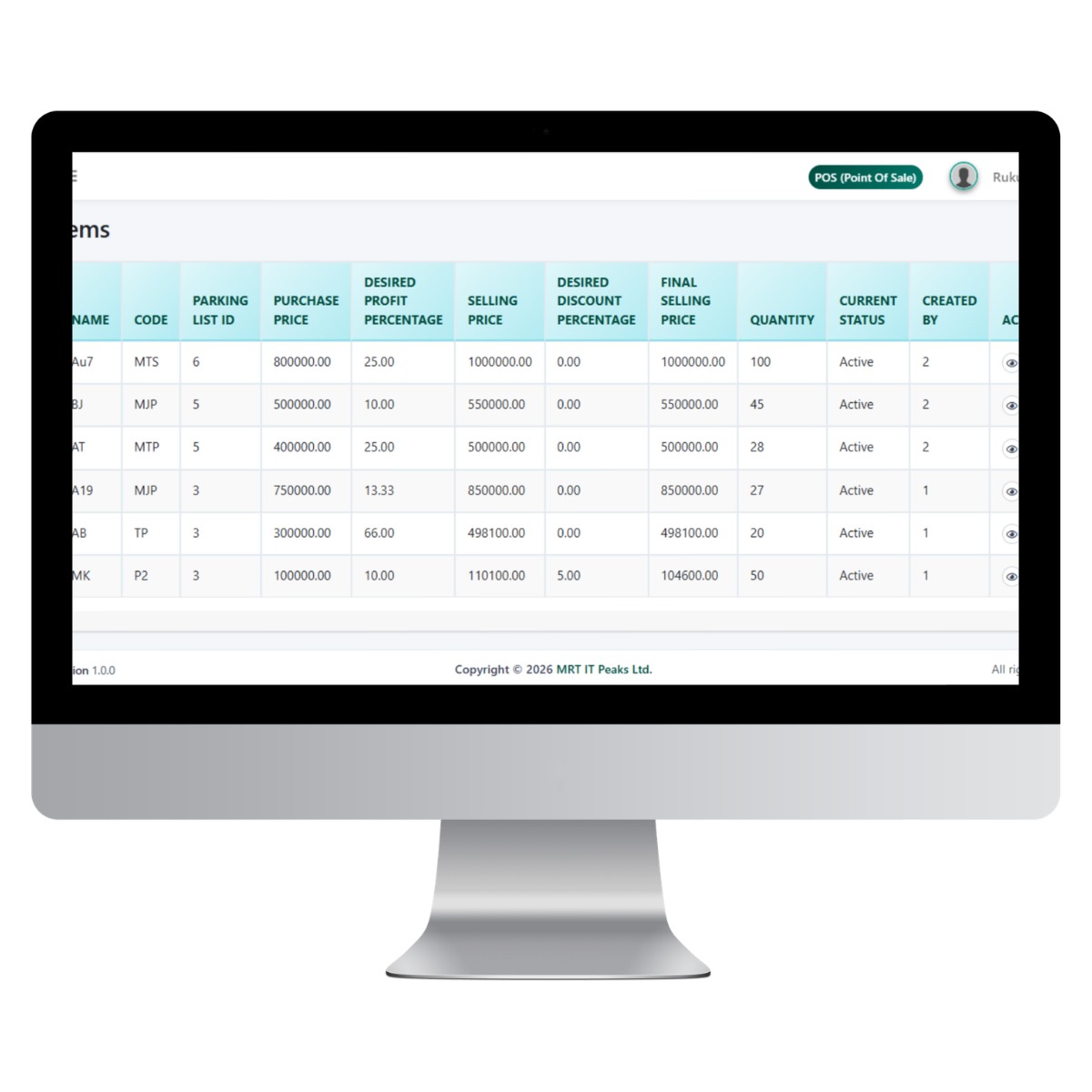
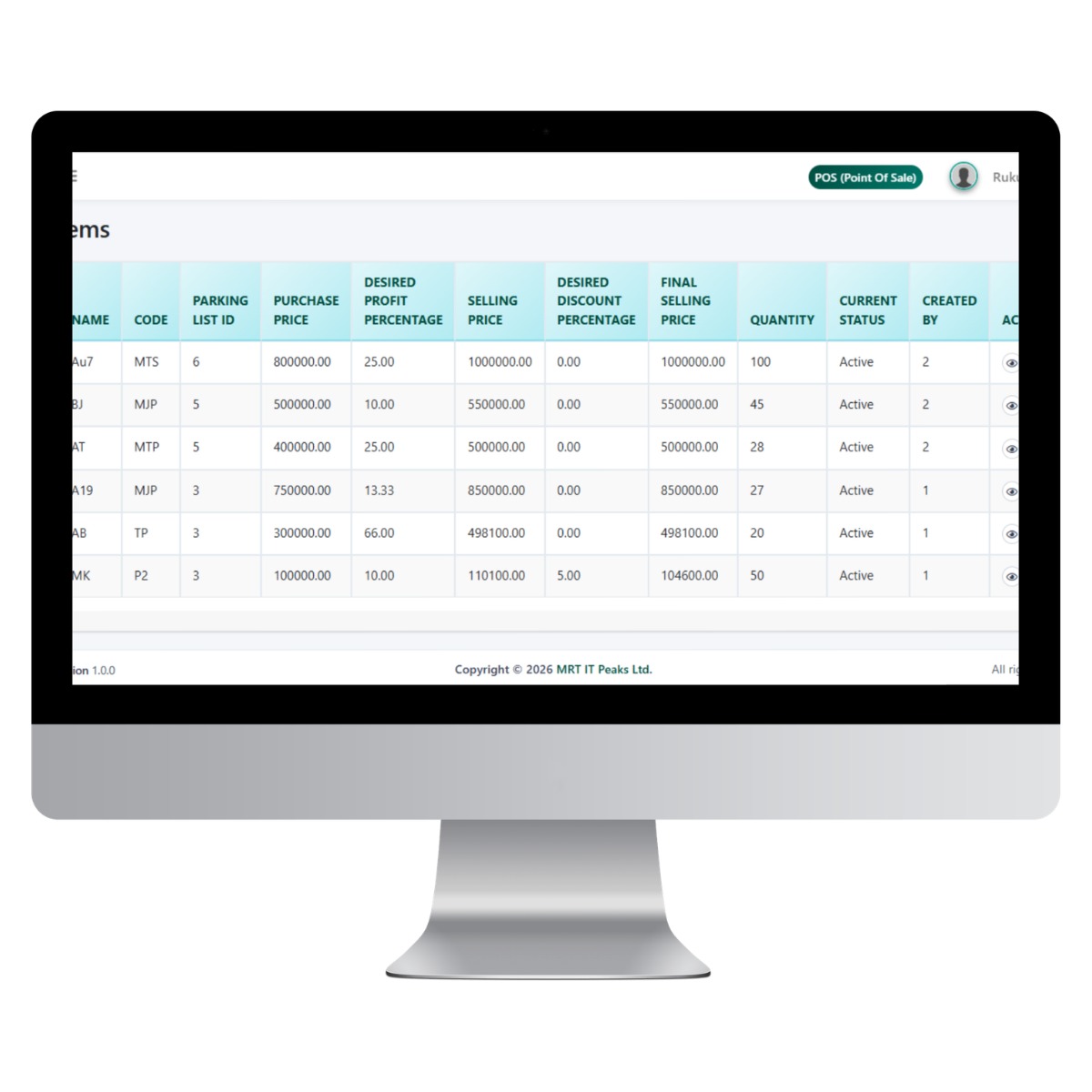
Stock List

A detailed inventory listing that gives businesses a centralized view of their products, pricing, available quantities, and current stock status.

What to notice The table provides key product information including purchase price, desired profit margin, selling price, applicable discounts, final selling price, quantity in stock, and active status, supporting effective stock and pricing management.
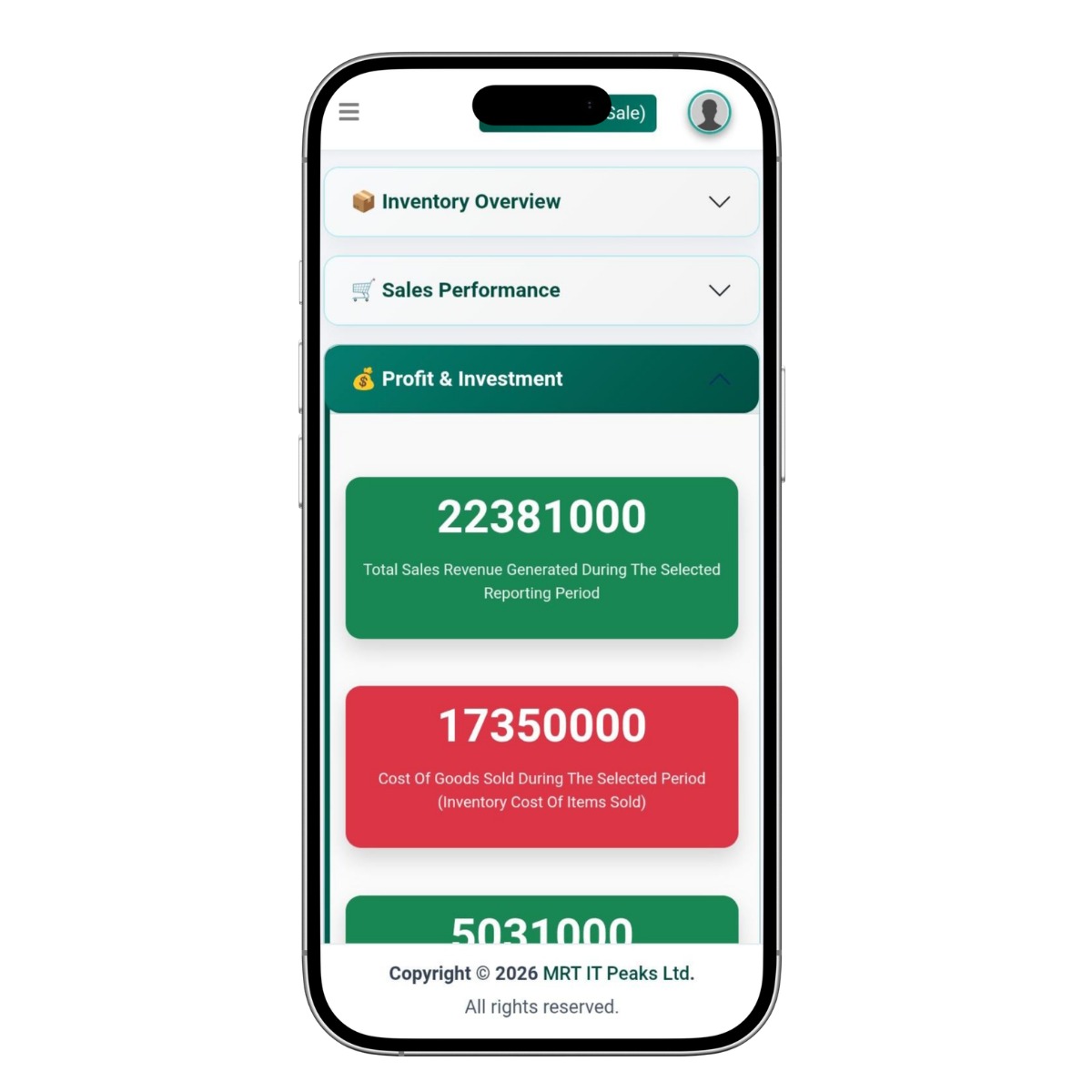
02 Product view Dashboard

Dashboard

A business performance dashboard that provides an overview of sales revenue, cost of goods sold, and profitability for a selected reporting period.

What to notice The dashboard clearly separates key financial indicators into visual cards, making it easy to compare generated sales revenue against inventory costs and assess overall business performance.
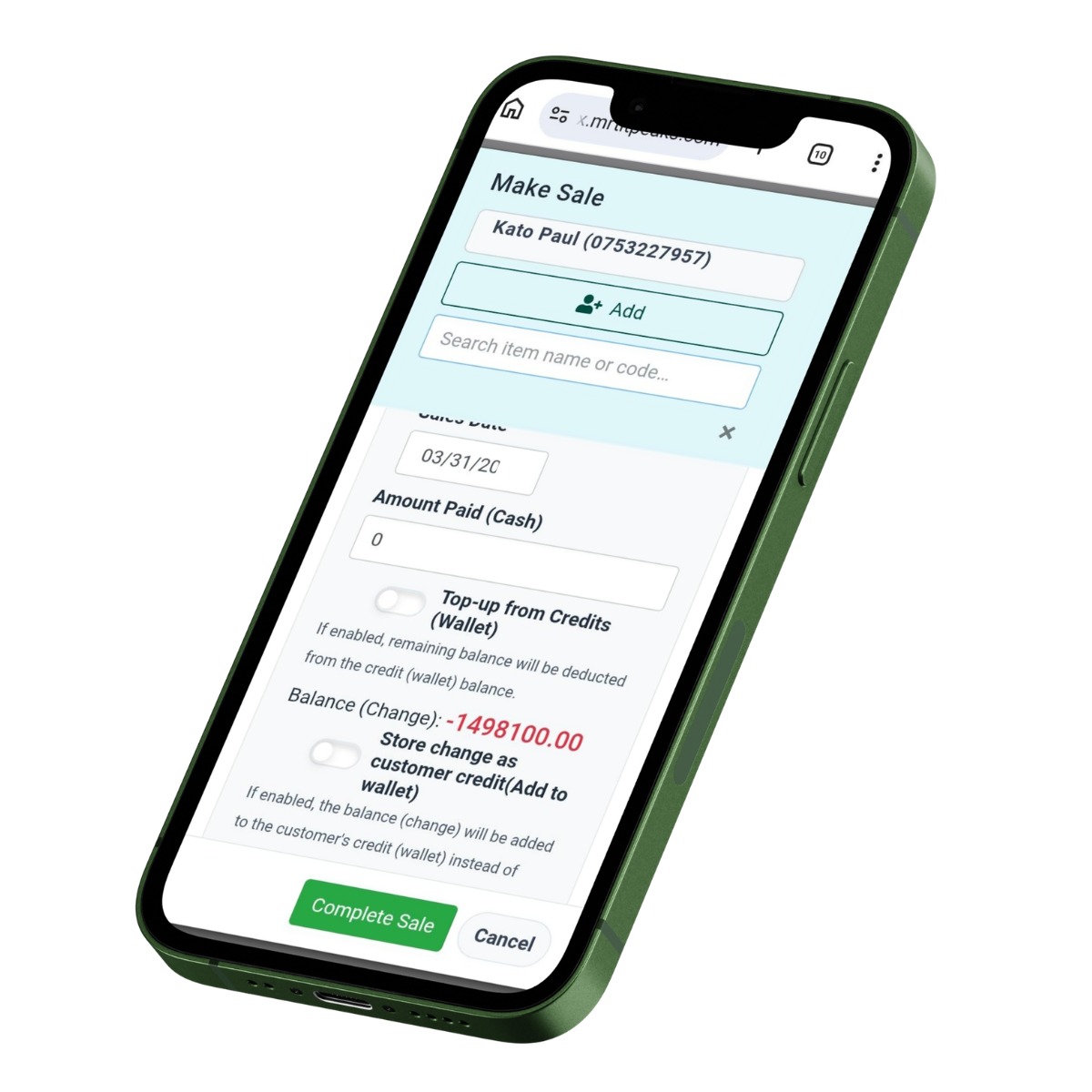
03 Product view Point of Sale (POS)

Point of Sale (POS)

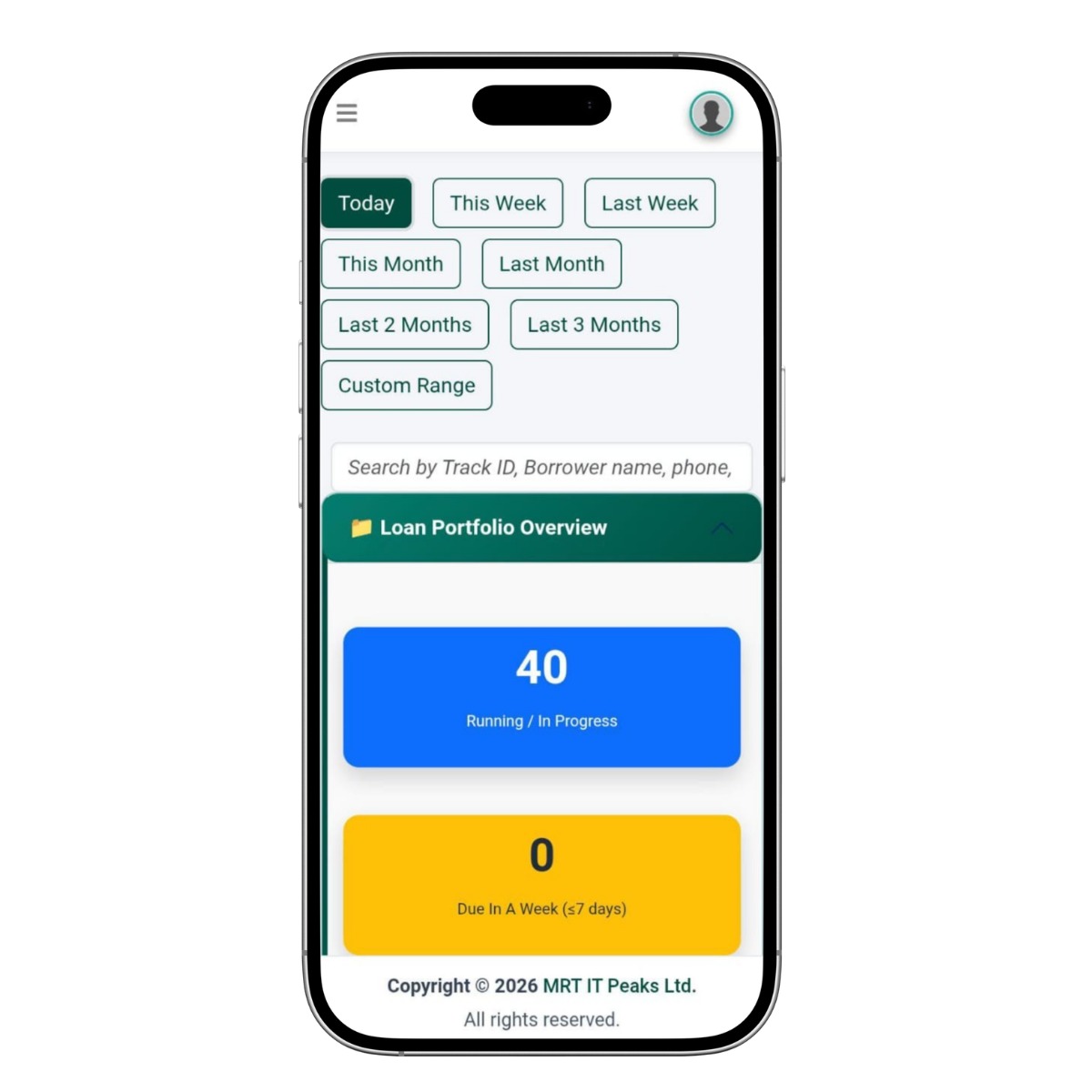
A mobile point-of-sale interface that enables businesses to process customer purchases, select products, record payments, and manage customer credit or wallet balances

What to notice The screen streamlines the sales process with customer selection, item search, payment entry, wallet/credit options, balance calculation, and a clear Complete Sale action.
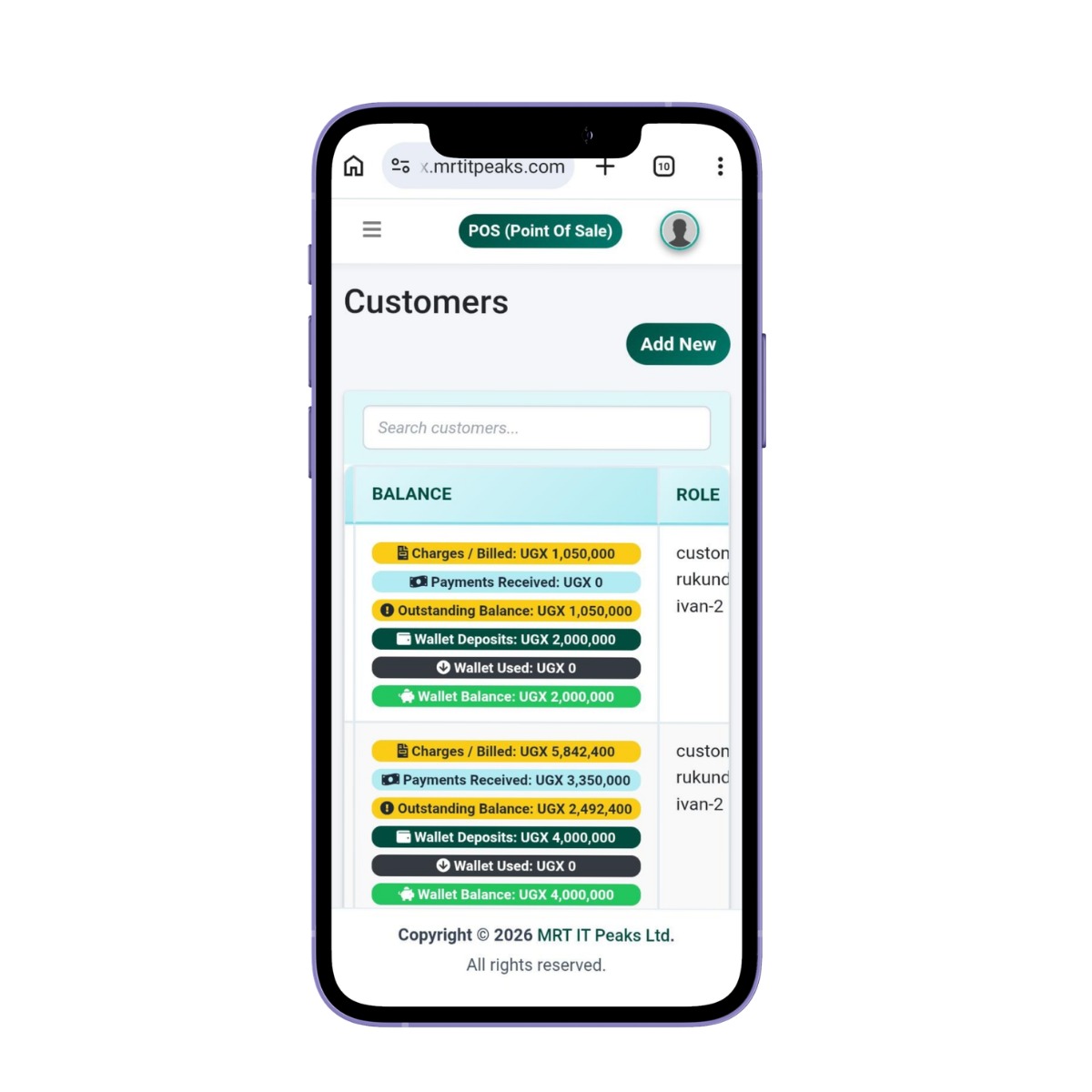
04 Product view Customer Profiles & Transaction History

Customer Profiles & Transaction History

A comprehensive customer management interface that provides a complete profile and history of each customer, bringing together their transactions, payments, balances, wallet activity, and other relevant account information in one place.

What to notice Each customer’s financial history is presented through clear indicators showing charges, payments received, outstanding balances, wallet deposits, wallet usage, and current wallet balance, giving businesses a complete view of the customer’s relationship and activity over time.
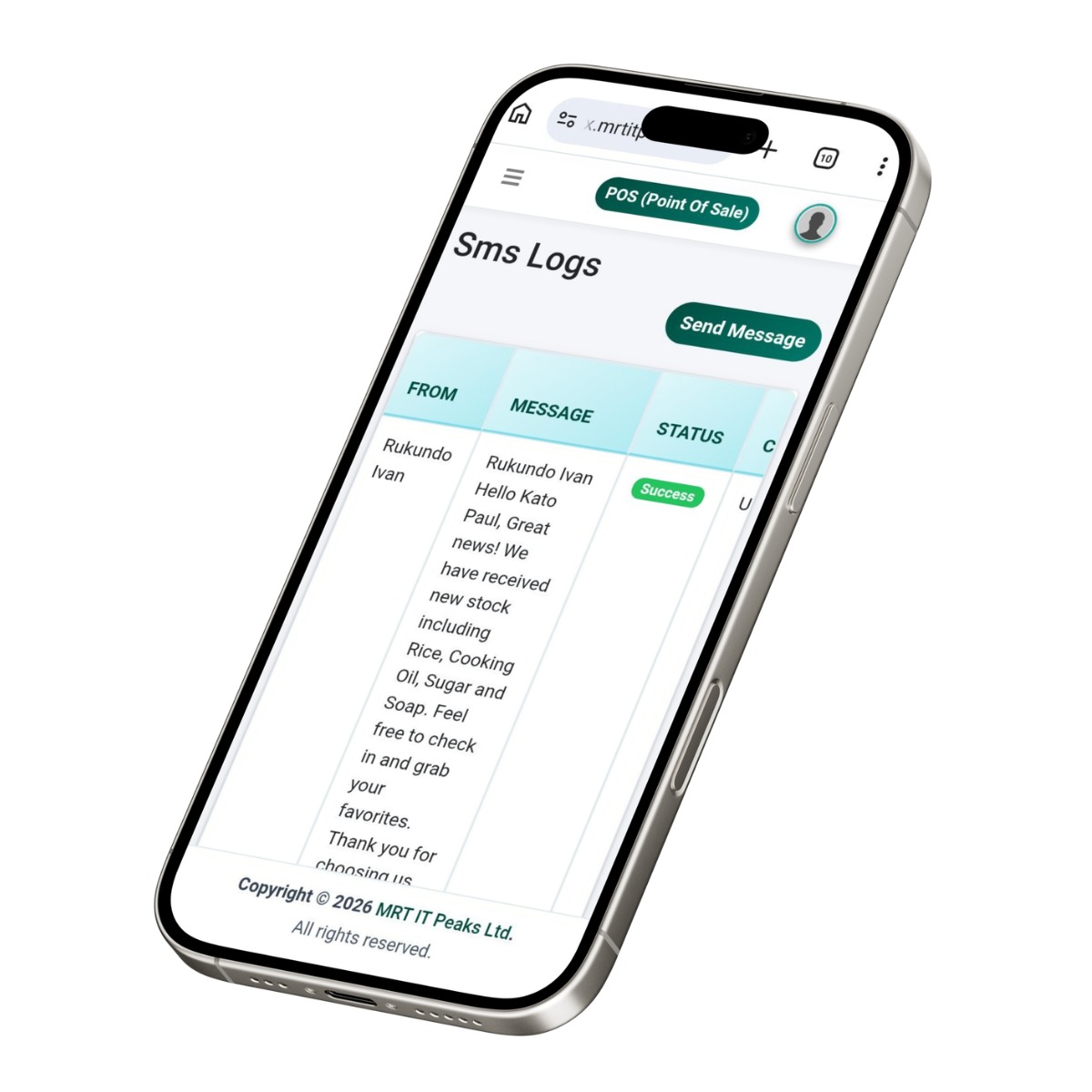
05 Product view SMS Communication & Notifications

SMS Communication & Notifications

A built-in messaging interface that enables businesses to send customer communications and maintain a record of outgoing SMS messages.

What to notice The screen provides a Send Message function alongside a clear SMS log showing the sender, message content, delivery status, and other communication details for easy tracking.
06 Product view Dashboard – Desktop View

Dashboard – Desktop View

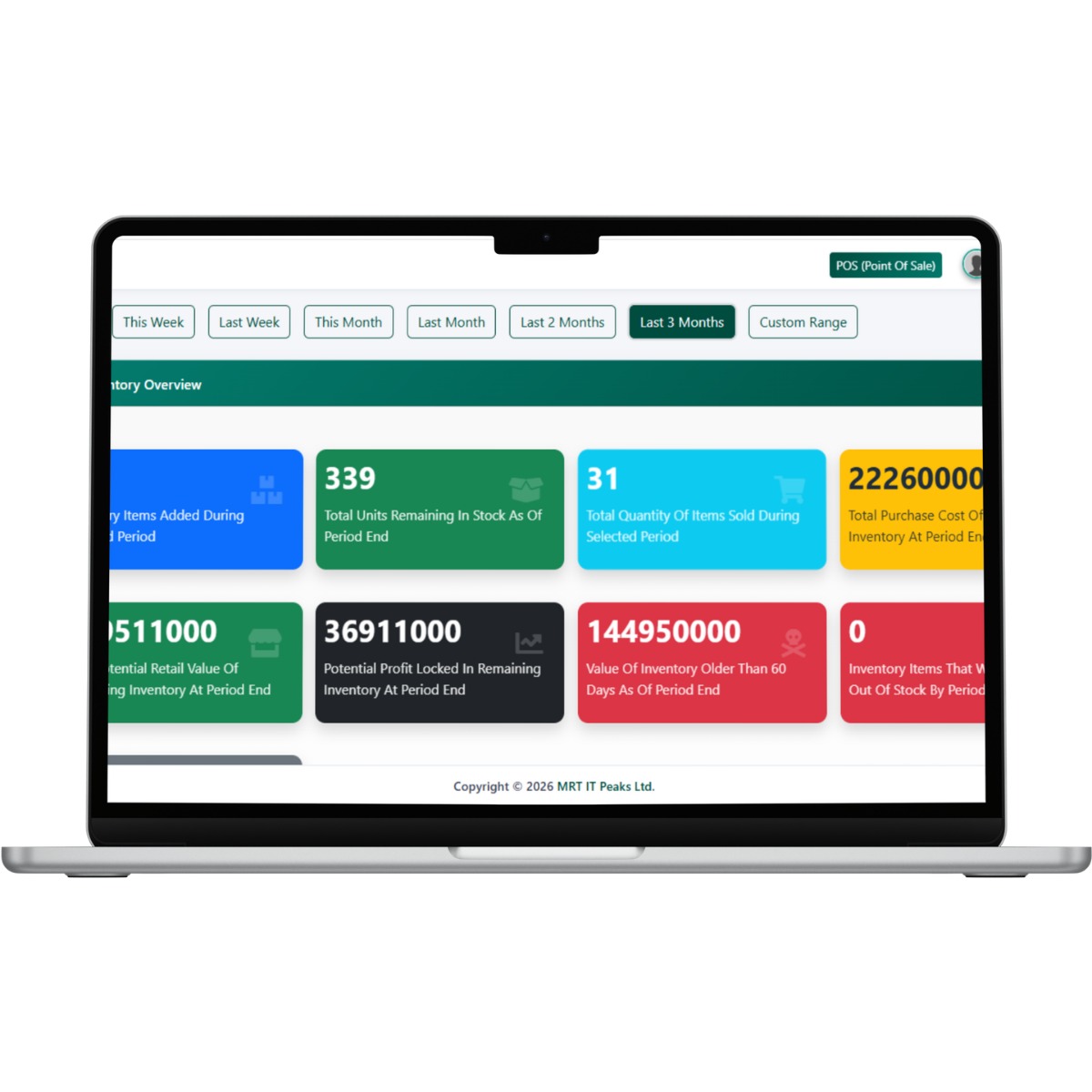
A comprehensive inventory management dashboard that provides businesses with a clear overview of stock levels, sales activity, inventory value, and potential profitability.

What to notice The dashboard highlights key inventory metrics including units remaining, items sold, purchase cost, retail value, potential profit, aging inventory, and out-of-stock items, with flexible reporting periods for monitoring stock performance.
Resources

Documents & Resources

Keep key product information close at hand with the guides, brochures and documents available for Tradex.

1 document
Commercial

Pricing that fits your rollout.

Choose the approach that makes sense for your organisation, then talk to our team about implementation and scale.

Subscription plans 3 options
Compare the available plans below and choose the structure that best matches your rollout needs.
01 Monthly subscription

Lite Plan

UGX 40,000.00
Track stock, record sales (cash & mobile money), calculate profit, and manage basic customer records - all from one simple dashboard. Includes 1 admin user.
02 Monthly Subscription

Business Plan

UGX 70,000.00
All in Starter, plus multi-user access (up to 5), advanced profitability tracking, expense tracking, automated SMS reminders, and detailed sales reports.
03 Monthly Subscription

Enterprise Plan

UGX 250,000.00
All in Business, plus unlimited users and locations, advanced analytics, bulk SMS campaigns, data export, and priority support.
Optional Extras

Extend your product with more.

Add optional capabilities, services and offers that complement your core product and support the way your organisation works.

Optional add-ons 4 extras
01 Monthly

Extra Stall / Shop

UGX 30,000.00
Monthly billing
Additional stall or shop
02 Monthly

Extra User

UGX 10,000.00
Monthly billing
Additional system user
03 Custom

Custom Integrations & Reports

Custom Pricing
Custom billing
Customized integrations or reporting
04 Annual

Annual Subscription Offer

Annual billing
Pay for 10 months Receive 12 months of access
Before You Begin

Everything needed for a smooth start.

Review the practical requirements before implementation so your team can prepare with confidence.

01
Device

Computer

Access Tradex from a computer

SpecificationDesktop/Laptop
Required
02
Device

Tablet

Mobile access to the system

SpecificationTablet
Optional
03
Device

Smartphone

Mobile access

SpecificationSmartphone
Required
04
Connectivity

Internet

Required for web-based access

SpecificationInternet connection
Required
05
Account

User Account

Each authorized user requires system access

SpecificationBased on assigned user role
Required
06
Business

Business Information

Information needed to configure the system

SpecificationBusiness and user details
Required
Connected Systems

Built to connect with your ecosystem.

See how this product fits into the systems, workflows and services your organisation already relies on.

Connected points 2 integrations
01 Integration point
Connected system

Mobile Money

Payment recording

Functionality Record sales paid through mobile money
Benefit Better payment records
02 Integration point
Connected system

SMS

Customer communication

Functionality Send reminders, follow-ups and stock notifications
Benefit Better customer communication
Support

Questions, answered clearly.

Get the essentials at a glance, then open any question for the full answer.

10 questions in this product guide
01 What is Tradex?
Tradex is a digital business management system that helps traders manage stock, sales, customers, expenses and business performance.
02 Who is Tradex for?
Tradex is designed for traders, including retail and wholesale businesses, shop owners, market vendors and businesses operating multiple locations. Its documented use cases also include clothes-bale and second-hand clothes traders.
03 Can Tradex manage stock?
Yes. Tradex provides inventory and stock-tracking functionality, including category-based stock management.
04 Can Tradex manage sales?
Yes. Traders can record daily sales and track sales by item, category, date, seller or location.
05 Can Tradex calculate profits?
Yes. Tradex supports profit and margin calculations and bale-level profitability tracking.
06 Can Tradex manage customers?
Yes. Customer profiles, purchase history, arrears and advances can be managed in the system.
07 Can Tradex manage multiple locations?
Yes. The documented system supports multi-user and multi-location management.
08 Can Tradex send SMS?
Yes. SMS can be used for customer payment reminders, follow-ups, new-stock notifications and promotional communication.
09 Can I access Tradex from my phone?
Yes. Tradex is documented as a web-based system accessible on desktop, tablet and mobile devices.
10 How much does Tradex cost?
Tradex is offered through subscription plans. The current benchmark contains Starter, Business and Enterprise plans.
Ready to Explore?

See what Tradex can do for your organisation.

Talk to the MRT IT Peaks team about your requirements, arrange a product demo, or start a conversation about implementation.